
Tap Tempo: Find Song BPM Instantly
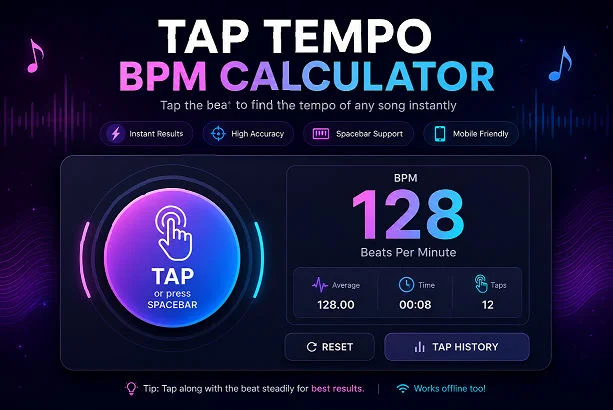
Music producers, DJs, drummers, guitarists, and video editors often need a quick way to detect the tempo of a song. That’s where a tap tempo tool becomes incredibly useful. Instead of manually counting beats, you can simply tap along with the rhythm and instantly calculate the BPM.
A modern tap tempo online tool acts as a smart music tempo tool, helping creators measure beats accurately in real time. Whether you are mixing tracks, practicing an instrument, editing a video, or creating music, a reliable tap BPM calculator saves time and improves workflow.
Today, many creators use tempo-based tools like a tempo tapper, beat counter, or rhythm calculator to match timing perfectly. Some advanced tools even support keyboard input as a spacebar BPM counter for faster control.
Direct Answer
A tap tempo tool lets users calculate a song’s BPM by tapping repeatedly to the beat. The tool measures the time between taps and converts it into beats per minute (BPM). It is commonly used by musicians, DJs, producers, and video editors to identify tempo quickly and accurately.
What Is Tap Tempo?
Tap tempo is a digital tool designed to calculate the speed or tempo of music. Users tap a button, keyboard key, or screen repeatedly in sync with a song’s beat. The tool then analyzes the intervals between taps and displays the BPM.
For example:
- Slow songs may range between 60–90 BPM
- Pop songs often sit around 100–130 BPM
- EDM tracks usually range from 120–150 BPM
A tempo measurement tool removes the guesswork and gives precise results instantly.
How Does a Tap Tempo Tool Work?
A tap BPM calculator works by recording the time between your taps. After several taps, the tool calculates the average interval and converts it into BPM.
Basic Formula
BPM = 60 ÷ Seconds Between Beats
If you tap every half second:
60 ÷ 0.5 = 120 BPM
The result is 120 BPM.
Modern online tools perform this calculation instantly and update the BPM live after each tap.
Benefits of Using a Tap Tempo Online Tool
1. Fast BPM Detection
You can instantly detect the tempo of any song without professional software.
2. Helpful for DJs
DJs use a tempo tapper to beat-match tracks during live performances.
3. Better Music Practice
Musicians use BPM tools to maintain rhythm consistency during practice sessions.
4. Useful for Video Editing
Video editors can sync transitions and cuts according to music tempo.
5. Easy for Beginners
A simple beat counter helps beginners understand rhythm and timing.
Who Uses Tap Tempo Tools?
A tap speed calculator is useful for many types of creators:
Musicians
- Guitarists
- Pianists
- Drummers
- Vocalists
DJs
- Beat matching
- Live mixing
- Tempo syncing
Producers
- Loop timing
- Sample matching
- Track arrangement
Content Creators
- YouTube editors
- TikTok creators
- Reel editors
Dance Instructors
- Rhythm timing
- Choreography synchronization
Features to Look for in a Good Tap Tempo Tool
Not all BPM tools offer the same experience. A high-quality music tempo tool should include useful features for accuracy and convenience.
Essential Features
Real-Time BPM Updates
The BPM should update instantly while tapping.
Spacebar Support
A good spacebar BPM counter allows keyboard tapping for faster input.
Mobile Compatibility
The tool should work smoothly on smartphones and tablets.
Reset Button
Users should easily reset calculations and start over.
Responsive Design
A clean layout improves usability on all devices.
Visual Feedback
Animated buttons and hover effects create a better user experience.
Tap Tempo vs BPM Counter
Many people confuse these terms, but they are slightly different.
| Tool | Purpose |
| Tap Tempo | Detect BPM by tapping |
| BPM Counter | General BPM measuring tool |
| BPM Calculator | BPM conversions and calculations |
| Metronome | Creates steady rhythmic beats |
A tap tempo online tool is actually one type of BPM counter.
Why BPM Matters in Music
Tempo affects the mood, energy, and feel of a song.
Slow BPM
Creates emotional or relaxing music.
Medium BPM
Common in pop and hip-hop tracks.
Fast BPM
Used in EDM, techno, and workout music.
Correct tempo helps:
- improve musical timing
- synchronize effects
- maintain groove
- enhance performance quality
How to Use a Tap Tempo Tool Correctly
Step-by-Step Guide
Step 1
Play the song or beat.
Step 2
Tap the button in sync with the rhythm.
Step 3
Continue tapping for 5–10 beats.
Step 4
Read the BPM result.
Step 5
Reset and repeat if needed.
For best accuracy:
- tap consistently
- avoid pauses
- use headphones if possible
Best Use Cases for Tap Tempo
DJ Mixing
A tempo finder helps DJs align tracks smoothly.
Songwriting
Writers can identify tempo ideas quickly.
Practice Sessions
Musicians improve timing using BPM references.
Dance Training
Instructors match choreography with exact rhythm speed.
Podcast & Video Editing
Editors synchronize cuts and effects with music tempo.
Why Online Tap Tempo Tools Are Popular
Online tools have become more popular because they:
- work instantly
- require no downloads
- are mobile friendly
- are free to use
- support quick workflow
A browser-based rhythm calculator is now more convenient than many desktop applications.
Tips for Accurate BPM Measurement
To improve accuracy:
- Tap naturally
- Use at least 6–8 taps
- Avoid tapping too slowly
- Stay consistent with rhythm
- Use keyboard tapping for better control
Many professional creators prefer a spacebar BPM counter because keyboards allow more precise timing than touchscreens.
Future of Music Tempo Tools
Modern BPM tools are evolving rapidly. Future features may include:
- AI-powered tempo detection
- Automatic song BPM analysis
- Smart rhythm recognition
- DAW integration
- Audio upload support
These improvements will make online tempo measurement tools even more powerful for creators.
Conclusion
A tap tempo tool is one of the simplest yet most useful utilities for musicians, DJs, producers, and creators. Whether you need a quick tap BPM calculator, an accurate beat counter, or a fast tempo tapper, online tools provide instant results without complicated software.
By tapping along with the rhythm, you can quickly identify BPM and improve music production, editing, practice sessions, and live performances. As digital music creation continues to grow, tempo tools will remain essential for creators everywhere.
FAQs
1. What is tap tempo used for?
Tap tempo is used to calculate the BPM of music by tapping along with the beat.
2. How accurate are tap tempo tools?
Most online tools are highly accurate if you tap consistently for several beats.
3. Can I use spacebar for BPM tapping?
Yes, many modern tools support keyboard input as a spacebar BPM counter.
4. What BPM is best for pop music?
Most pop songs range between 100–130 BPM.
5. Is tap tempo free to use?
Yes, most online tap tempo and BPM calculator tools are completely free.